


Sign Up
First, decide which course or lesson you'd like to attend
In the side menu section Timetable move your mouse over the course you wish to attend

Click on the line Book in / Pricing
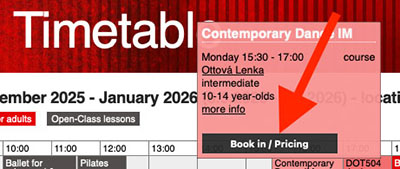
A Course booking will appear
Fill in the participant’s details — including proper diacritics (accents, marks) - If you enter a date of birth of your child, additional fields will appear for entering the Legal guardian of course member details
Select your method of payment for the course fee
If you wish to attend only a trial lesson, check the box marked "trial lesson only".

After agreeing to the General Terms and Conditions and the Information on Personal Data Processing click the Continue button

A dialog box will appear, prompting you to review your entered information
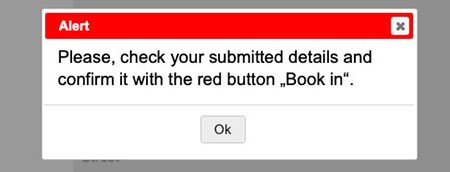
After checking all filled in items in the form, confirm by clicking the Book in button

After submitting the registration form, read the next steps that the studio will follow
Done
You can find more detailed information about course Book in here.